
Lead
Hi, I’m Pomarano.
I previously wrote about semi-automating X post drafts. This time it is a small app on LINE.
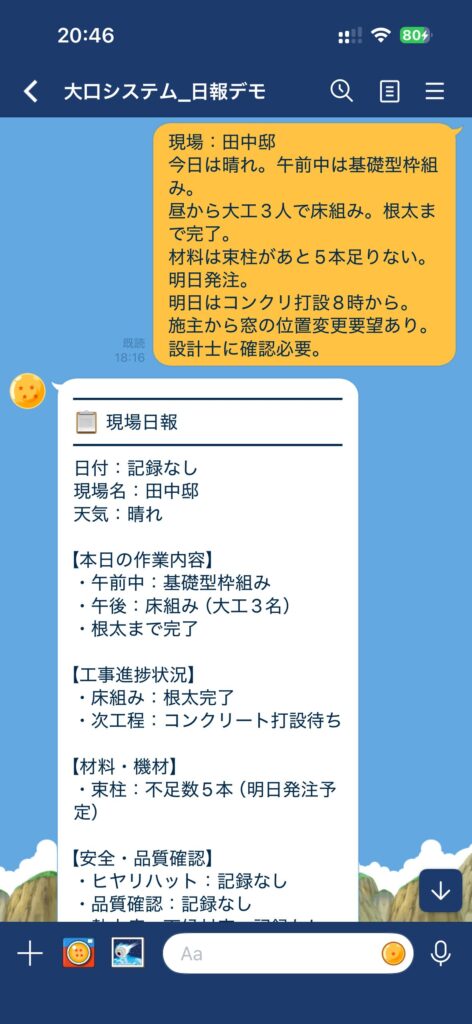
I built a LINE bot that takes field notes or voice memos and returns them formatted as a construction site daily report (現場日報). It runs on Railway.
The target users are general contractors and construction crews — speak with gloves on, send bullet points from the car on the way home, that kind of flow.
This post covers why LINE, what the bot does, how it is designed, and what broke along the way.
- Japanese version: LINEで現場日報を作るボットを試した
Why daily reports on LINE
Site daily reports usually follow a company template — and writing them is a chore.
On site, people often:
- Have dirty hands and cannot type long text
- Plan to write everything after work, then forget
- Have rough notes but no time to polish them for submission
LINE is already common on many job sites, so asking people to install another app felt like extra friction.
Input can be text or voice. Output goes straight back in the chat — one simple path.
What the bot does
| Input | Processing | Output |
|---|---|---|
| Text | Send field notes as-is | Formatted site daily report |
| Voice | Whisper transcription → report generation | Transcript + report |
| Edit instruction | e.g. “add …”, “fix the weather” | Rewrites the previous report |
Send help or usage (or the Japanese equivalents) to get a short guide.
Report template
Notes are sorted into sections such as:
- Date, site name, weather
- Today’s work
- Progress (completed / remaining)
- Materials and equipment
- Safety and quality (near-miss, heat stress, etc.)
- Tomorrow’s plan
- Handover items
Output is LINE-friendly plain text with lines and emoji — no Markdown # or **.
Items not mentioned in the notes are labeled 「記録なし」 (not recorded).
The prompt forbids the model from inventing facts — important on real job sites.
End-to-end flow
Text
flowchart LR
  A[Worker sends memo on LINE] --> B[Webhook]
  B --> C[Claude formats report]
  C --> D[Reply on LINE]
  C --> E[Save .md on server]
Voice
flowchart LR
  A[Voice message] --> B[Reply: processing]
  B --> C[Download audio]
  C --> D[faster-whisper]
  D --> E[Push transcript]
  E --> F[Claude generates report]
  F --> G[Push report]
Voice takes time, so the bot replies once with “transcribing…” and sends results via push messages (see below).
Tech stack
| Piece | Choice | Why |
|---|---|---|
| LINE | Messaging API (Webhook) | Add as friend and use |
| Server | FastAPI | Webhook + health check in one app |
| Reports | Claude Haiku | Fast, cheap, good for templated formatting |
| Voice | faster-whisper (base, CPU) | Local transcription of LINE audio |
| Hosting | Railway | Quick MVP deploy |
Environment variables include LINE_CHANNEL_SECRET, LINE_CHANNEL_ACCESS_TOKEN, and ANTHROPIC_API_KEY.
Secrets stay on the server only — not in the repo.
Design choices
Do not fill in what is not in the notes
If the AI makes up crew counts or progress, the report is useless (or worse). The system prompt enforces:
- No guessing
- Unknown fields → 「記録なし」
- Use trade terms only as they appear in the input
Same idea as Measuring AI Harness Engineering with JSON — fix output shape and forbidden behavior in the prompt.
Edits continue the chat
Messages containing words like 修正 (fix), 追加 (add), 直して (correct), etc. trigger a rewrite of the last report.
The bot keeps it in memory; after a restart it falls back to the latest saved file.
Reject very short text
Under 10 characters, there is not enough to format — the bot nudges the user with the usage guide.
What was awkward
LINE reply_token is one-shot
Voice flow is download → Whisper → Claude and slow.
After one reply (“transcribing…”), results must go out as push messages.
Mix this up and the user gets silence — text and voice use different send paths on purpose.
Whisper cold start
The faster-whisper model loads on first use.
On Railway’s free or small tiers, the first voice message after sleep can feel slow.
Short notes → lots of 「記録なし」
That is by design, but mostly empty reports are not helpful.
I am considering clearer nudges to send a bit more detail.
Deploy and current status
The webhook server is on Railway with a /health endpoint:
This is still an MVP / demo.
I am testing memo-style input myself before offering a free trial to local contractors.
Unlike the X semi-automation setup, this finishes inside LINE.
There is no auto-sync to back-office systems yet — only formatted text in chat.
Summary
- A LINE bot for construction site daily reports from text or voice
- Claude Haiku for formatting, faster-whisper for transcription
- Missing facts stay 「記録なし」 — no invented details
- Edit instructions rewrite the previous report
- MVP on Railway; ERP / submission integration is future work
“If you only jot a memo now, we will turn it into the report later” — that might be easier to keep doing on site.

コメント