
Lead
Hi, I’m Pomarano.
This is Part 1 of my AI Agent Study Notes.
Read it together with the series index Building Your Own AI Agents — Study Series (update after index is published).
This part clarifies what an AI agent is. Based on common industry framing, we cover four topics:
- How agents differ from generative AI — reactive vs proactive
- What agents can do — which workflows they fit
- Main components — brain, orchestrator, tools
- Benefits and risks — what to expect when you adopt them
The concrete blog example (copywriting + proofreading for X) starts in Part 2. Here we lay the conceptual foundation.
- Japanese version: AIエージェントとは何か(第1回)*
How agents differ from generative AI
1-1. Reactive vs proactive
Sources like Gartner often explain the difference as reactive vs proactive:
- Generative AI — mainly answers prompts and generates text or images. Closer to reactive
- AI agent — observes the environment, decides what to do next, and executes. Closer to proactive
Asking ChatGPT or Claude to “fix this sentence” in chat is the former.
Handing over a goal like “every morning, follow the spec, write a draft, and save it to a file” is the latter.
1-2. What generative AI is good at
NTT Docomo Business and similar sources describe generative AI as responding to human prompts by generating and returning text or images:
- Answering questions, polishing prose, fixing code snippets
- Flexible back-and-forth in the moment
- The human explains what they want each time
Strong for one-off consultation and creation.
1-3. Where agents differ
The same sources describe agents as taking a goal, breaking it into steps, running tasks (web search, APIs, file I/O), and moving toward evaluation of results.
In the terms this series uses:
| Aspect | Generative AI (chat) | AI agent |
|---|---|---|
| Stance | Reactive — responds to prompts | Proactive — advances toward a goal |
| Instructions | Prompt each time | Fixed goal + spec / prompt |
| Scope | Mostly text generation | Search, files, tool calls |
| Output | Conversation text | Durable artifacts (e.g. files) |
| Repetition | Re-explain each run | Same pattern daily / weekly |
| Human role | Involved every turn | Semi-auto — review after output (this series) |
Chat and agents are not opposites — they are complementary. Consult in chat; run routines with agents. That split makes design easier.
What AI agents can do
Agents are often described as running complex workflows autonomously, not just single replies (NTT Docomo Business and others). Four common areas:
2-1. Automation and efficiency
- Drafting and sending routine email
- Back-office tasks like expenses or calendar coordination
Work humans used to repeat step by step.
2-2. Research and analysis
- Search and analyze large datasets, internal docs, or the web
- Reports and proposals from those findings
One goal can cover the whole “research then summarize” flow.
2-3. Customer support
- Look up answers from a database
- End-to-end handling from suggestion through required steps
FAQ bots and procedure guides are typical.
2-4. Personalized recommendations
- Analyze preferences or purchase history
- Propose and book travel or products
Not just “here are ideas” — push toward completing the goal.
2-5. Personal blog example (this series)
Enterprise scale differs, but the mechanism is the same. For a personal blog or X account:
| Area | Personal example |
|---|---|
| Automation | One X draft every morning |
| Research | Buddhist topic research → 140-character summary |
| (Support-like) | Proofreading against a spec — detect and fix rule violations |
| Personalization | Weekday rotation, avoid duplicate themes in 30 days |
The copywriting agent ≈ research + copy. The proofreading agent ≈ rule-based quality check.
Neither auto-posts to X — semi-automatic (designed in Part 2).
Main components and how they work
Advanced agent tasks usually involve three mechanisms working together (Gartner, NTT Docomo Business, etc.).
3-1. AI model (the brain)
LLMs handle:
- Understanding context
- Planning
- Generating code or copy
ChatGPT, Claude, and Cursor models live here.
3-2. Orchestration (the coordinator)
Manages execution state, tool calls, and task order:
- Which step are we on?
- Read a file next, or search the web?
- After copy, call proofreading?
Cursor Agent and GitHub Actions + Cursor SDK sit close to this layer.
3-3. External tools
Systems the AI operates to finish the job:
- Web search
- APIs
- Calendars, databases
- File read/write (mostly
.mdin this series)
A brain alone cannot save to a folder. Tools determine practical usefulness.
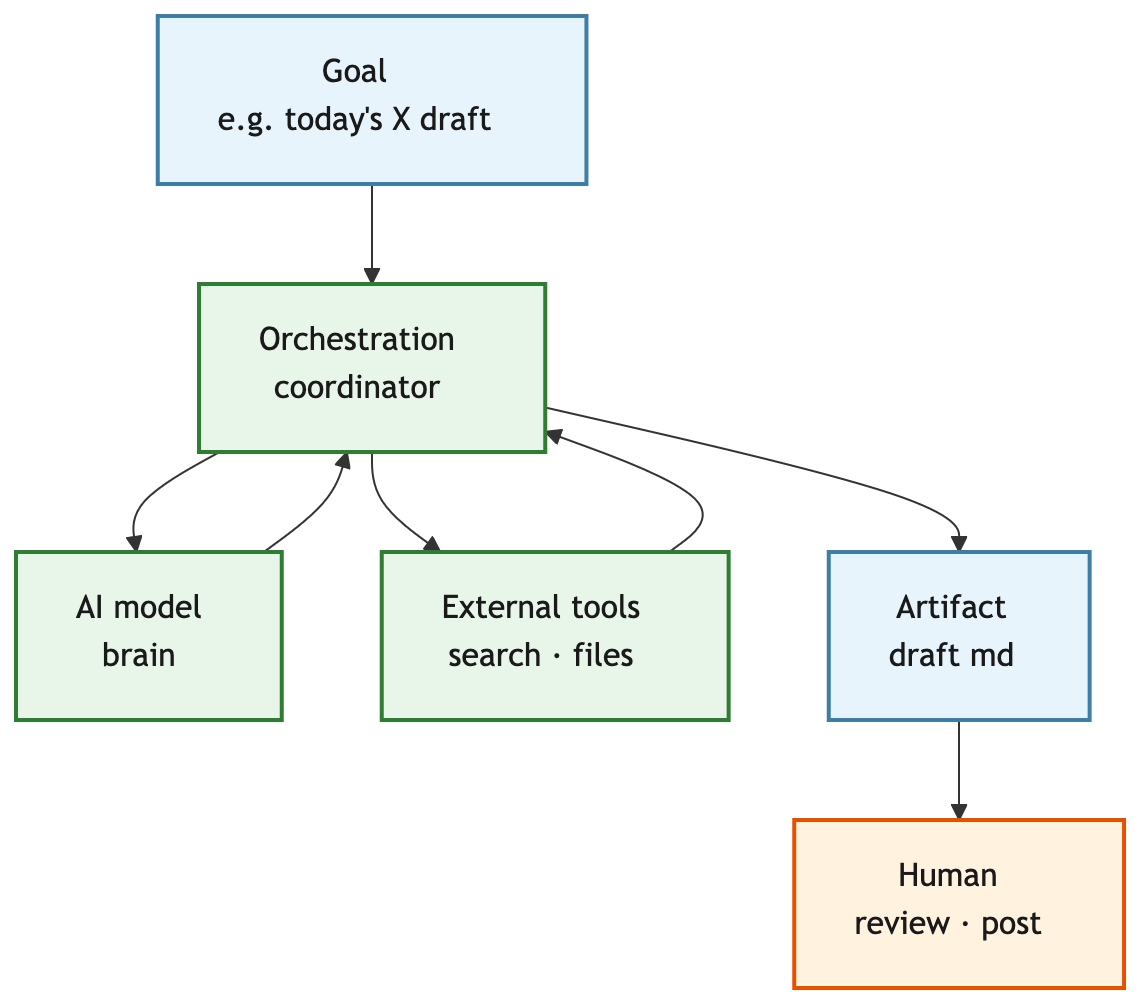
3-4. How the three connect
flowchart TB
  G["Goal<br/>e.g. today's X draft"]
  M["AI model<br/>brain"]
  O["Orchestration<br/>coordinator"]
  T["External tools<br/>search · files"]
  OUT["Artifact<br/>draft md"]
  H["Human<br/>review · post"]

  G --> O
  O --> M
  O --> T
  M --> O
  T --> O
  O --> OUT
  OUT --> H

  classDef concept fill:#e8f4fc,stroke:#3d7ea6,stroke-width:2px,color:#1a1a1a
  classDef agent fill:#e8f5e9,stroke:#2e7d32,stroke-width:2px,color:#1a1a1a
  classDef human fill:#fff3e0,stroke:#e65100,stroke-width:2px,color:#1a1a1a
  class G concept
  class OUT concept
  class M agent
  class O agent
  class T agent
  class H human
3-5. The “rules layer” for personal use
Industry write-ups rarely emphasize this, but externalizing rules stabilizes personal setups:
| Piece | Role | This series |
|---|---|---|
| spec | Source of truth for format and bans | x-shuuchaku-agent-spec.md |
| prompt | “Run today’s job per spec” | automation/x-daily/prompt.md |
| Human review | Final call and posting | Email check → paste to X |
The harness article on verifiable steps, not wishes, and the proofreading agent (Parts 2–3) thicken this rules layer.
Benefits and challenges
4-1. Benefits
IBM and NTT Docomo Business cite roughly:
| Benefit | Content |
|---|---|
| Productivity | Automate repetitive work (collection, routine processing) |
| 24/7 operation | Less tied to human working hours |
For a personal blog:
- Freedom from “what do I write this morning?”
- Draft
.mdfiles stay as a record - Add agent 2, 3, … with the same spec + prompt pattern
4-2. Risks
| Risk | Content |
|---|---|
| Security / leakage | Strict access control if agents touch secrets or PII (NTT Docomo Business) |
| Unpredictable errors | Autonomous judgment can produce unexpected output — human final review needed (NTT Docomo Business) |
Common in personal use too:
| Issue | Content |
|---|---|
| Quality variance | Same spec, still over character limits (measured in Part 3) |
| Hallucination / tone | Human eyes especially for cultural or teaching topics |
| Ops cost | Maintaining specs, fixing failures |
| Policy risk | Full auto-posting to SNS is not zero-risk |
This series assumes semi-automatic — AI produces, humans decide — balancing risk and productivity.
4-3. Harness and proofreading
Relying only on “human final review” makes every run heavy. Add:
- Harness — validate output, retry if bad (harness article)
- Proofreading agent — a second agent runs the checklist (Parts 2–3)
Writing rules alone is not enough — that is the motivation for the Part 3 comparison.
Summary
- Generative AI is closer to reactive generation; agents are proactive toward a goal
- Capabilities span automation, research, support, recommendations — shrink to daily copy + proofreading for individuals
- Model · orchestration · tools plus spec / prompt / human review for personal use
- Benefits: productivity and 24/7; risks: security and surprises — semi-auto and proofreading keep it practical
- Next: two-agent design (copy + proofread) in Part 2

コメント