
Lead
Hi, I’m Pomarano.
In the AI Agents Primer (Japanese), I outlined the workplace map and a semi-automated customer inquiry use case. This post is the Dify build walkthrough for that same case.

The flow has four stages:
- Classify — category and urgency
- Knowledge retrieval — pull relevant FAQ chunks
- Draft — write a reply using retrieval context
- Review — tone, forbidden phrases, required items
Humans still send replies — semi-automation only. The second half includes test results and screenshots for three inputs.
Works on Dify Cloud or self-hosted. UI labels vary by version; focus on node roles rather than exact menu names.
- Japanese version: here
Overview
flowchart LR
  K["Knowledge<br/>FAQ"]
  W["Workflow"]
  C["Classify"]
  R["Retrieve"]
  D["Draft"]
  V["Review"]
  H["Human review"]

  K --> W
  W --> C --> R --> D --> V --> H

  classDef agent fill:#e8f5e9,stroke:#2e7d32,stroke-width:2px,color:#1a1a1a
  classDef io fill:#eceff1,stroke:#607d8b,stroke-width:2px,color:#1a1a1a
  class C,R,D,V,W agent
  class K,H io

| Part | Content |
|---|---|
| Primer | AI Agents Primer (JP) |
| This post | Dify build details |
| Next | LangGraph build details (JP) |
1. Target Spec (Fix Before Building)
1-1. Input
| Field | Example |
|---|---|
| Inquiry body | “I was billed twice last month. Order A-1001.” |
| (Optional) customer ID / order ID | Can be extracted from body |
1-2. Intermediate output (classify)
Fixed JSON — not free text:
{
  "category": "billing",
  "urgency": "normal",
  "reason": "Suspected double billing"
}
| category | Meaning |
|---|---|
billing | Billing / payment |
tech | Bug / how-to |
cancel | Cancellation / account closure |
other | Other |
| urgency | Meaning |
|---|---|
high | Needs same-day reply |
normal | Standard |
low | Low priority |
1-3. Final output (after review)
| Field | Content |
|---|---|
reply_draft | Customer reply draft |
review_notes | Fixes and notes for humans |
needs_human | true / false (e.g. out-of-scope promises) |
1-4. Four elements in Dify
| Element | Where in Dify |
|---|---|
| Brain | LLM nodes (classify / draft / review) |
| Memory | Knowledge base (FAQ) + Knowledge Retrieval node + workflow variables |
| Tools | (Later) HTTP request for order lookup; optional at first |
| Reflection | Review LLM node |
2. Setup
- Log in to Dify (self-hosted in this build)
- Configure LLM models (cheap model for classify, quality model for draft/review — optional split)
- App name example:
inquiry-assist-v1
Start with a Workflow app. Add a Chatflow UI or API call later.
FAQ text matches assets/dify-inquiry-assist/faq-sample.md in the repo.
3. Build Knowledge (Memory)
Load FAQ before drafting.
3-1. Minimal FAQ document
# Support FAQ (sample)

## Billing looks duplicated
- Confirm order ID first
- If duplicate is possible, say you will investigate — do not confirm refund
- Investigation may take 1–3 business days

## Cannot log in
- Guide password reset
- If still failing, ask for device / browser info

## Want to cancel
- Share cancellation URL
- Retention pitch: one sentence max; no aggressive retention
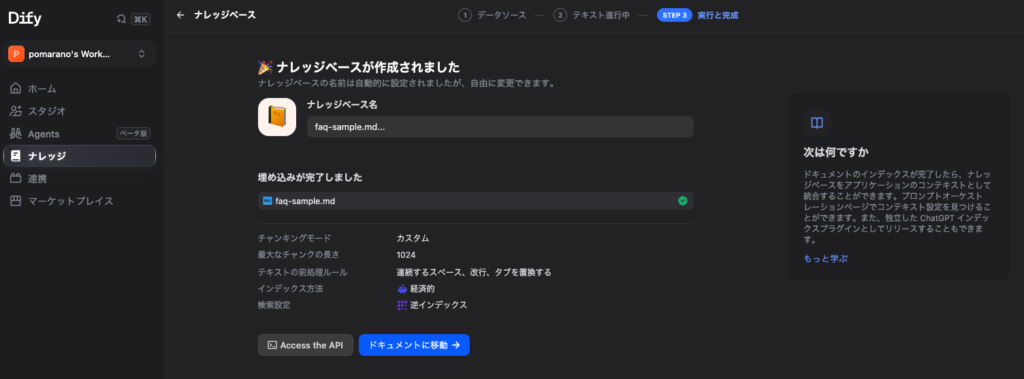
3-2. In Dify
- Create Knowledge (e.g.
support-faq-sample) - Upload
.mdor paste text - Wait for indexing
- Reference it from the Knowledge Retrieval node later
Tip: start with 10–20 FAQ items, not the whole internal wiki.
4. Workflow Diagram
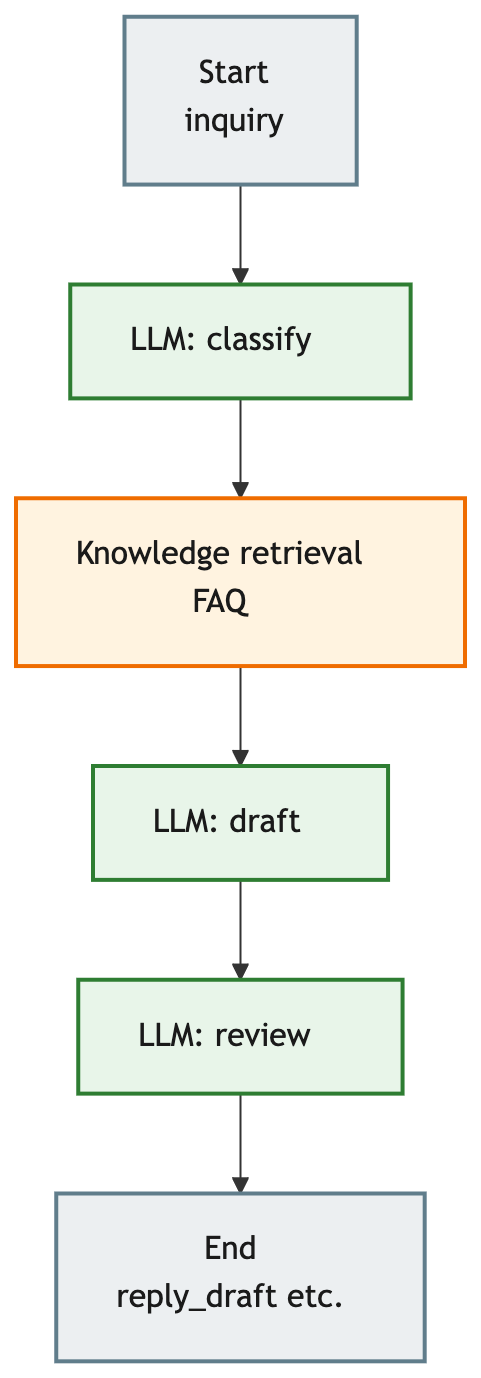
This build uses one draft LLM (prompt references category); branch by category later if needed.
If the draft LLM has no built-in knowledge hook, put Knowledge Retrieval immediately before draft (this article’s setup).
flowchart TB
  START["Start<br/>inquiry"]
  CLS["LLM: classify"]
  RET["Knowledge retrieval<br/>FAQ"]
  DRAFT["LLM: draft"]
  REV["LLM: review"]
  ENDN["End<br/>reply_draft etc."]

  START --> CLS --> RET --> DRAFT --> REV --> ENDN

  classDef agent fill:#e8f5e9,stroke:#2e7d32,stroke-width:2px,color:#1a1a1a
  classDef memory fill:#fff3e0,stroke:#ef6c00,stroke-width:2px,color:#1a1a1a
  classDef io fill:#eceff1,stroke:#607d8b,stroke-width:2px,color:#1a1a1a
  class CLS,DRAFT,REV agent
  class RET memory
  class START,ENDN io

5. Node Configuration
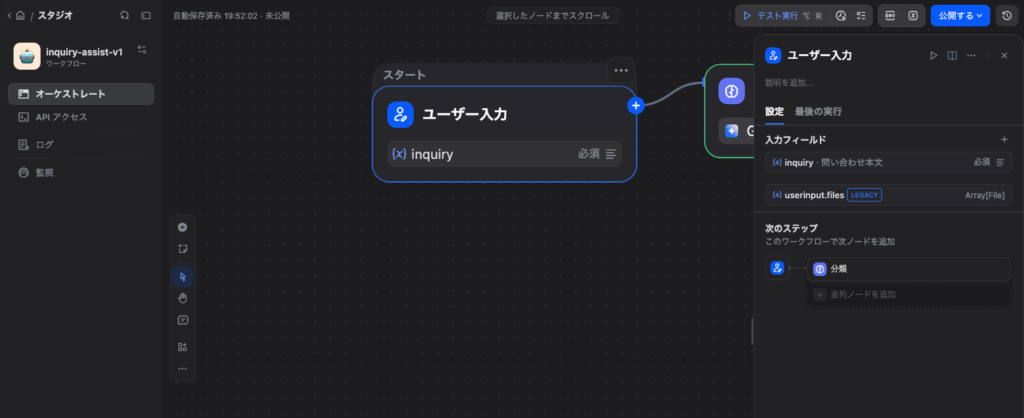
5-1. Start (input variable)
| Variable | Type | Required |
|---|---|---|
inquiry | Paragraph (string) | Yes |
Paste test inquiries from the start form.
5-2. LLM node “Classify” (brain)
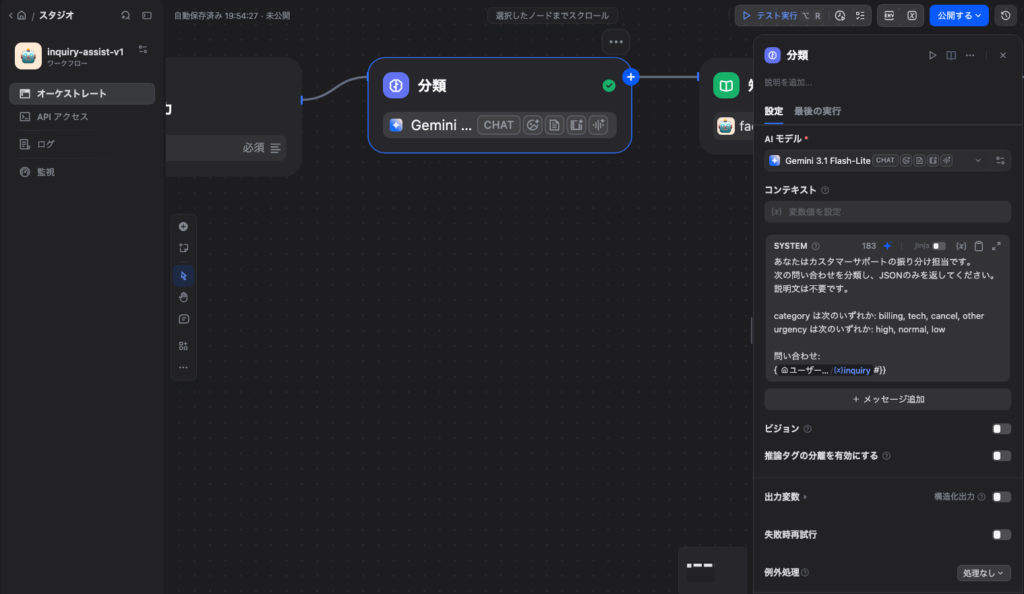
Goal: return only category / urgency / reason.
Prompt (Japanese support scenario — replies are in Japanese):
あなたはカスタマーサポートの振り分け担当です。
次の問い合わせを分類し、JSONのみを返してください。説明文は不要です。

category は次のいずれか: billing, tech, cancel, other
urgency は次のいずれか: high, normal, low

問い合わせ:
{{inquiry}}

出力形式:
{"category":"...","urgency":"...","reason":"..."}
Tips:
- Force JSON output (structured output if available)
- Low temperature (0–0.3)
- On parse failure, fallback to
other/normal
Save to variables: category, urgency, classify_reason.
5-3. Knowledge Retrieval node (memory)
Place after classify when the draft LLM lacks knowledge binding.
| Setting | Value |
|---|---|
| Knowledge | support-faq-sample (§3) |
| Query | {{inquiry}} |
| Output | result (hit array) |
Filtering by category is optional; inquiry text alone is enough for v1.
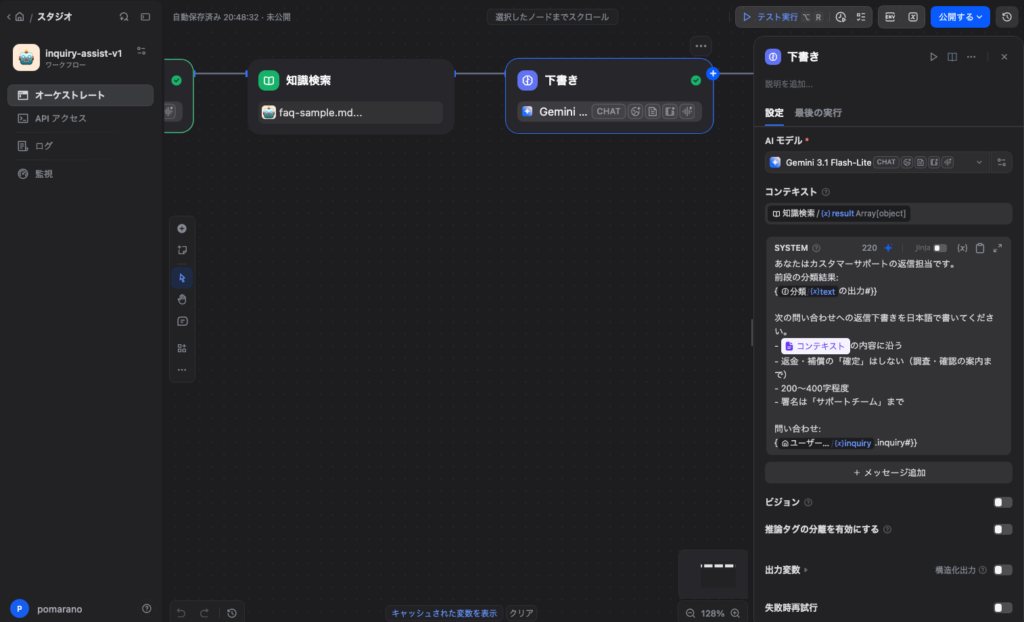
5-4. LLM node “Draft” (brain + memory)
Pass retrieval output as context.
| Setting | Value |
|---|---|
| Context | Knowledge Retrieval result |
| Output variable | reply_draft_raw |
Prompt:
あなたはカスタマーサポートの返信担当です。
分類結果: {{分類ノードの text 出力}}

次の問い合わせへの返信下書きを日本語で書いてください。
- コンテキストの内容に沿う
- 返金・補償の「確定」はしない(調査・確認の案内まで)
- 200〜400字程度
- 署名は「サポートチーム」まで

問い合わせ:
{{inquiry}}
Key: retrieve → context → draft, not direct knowledge on the draft LLM when that feature is unavailable.
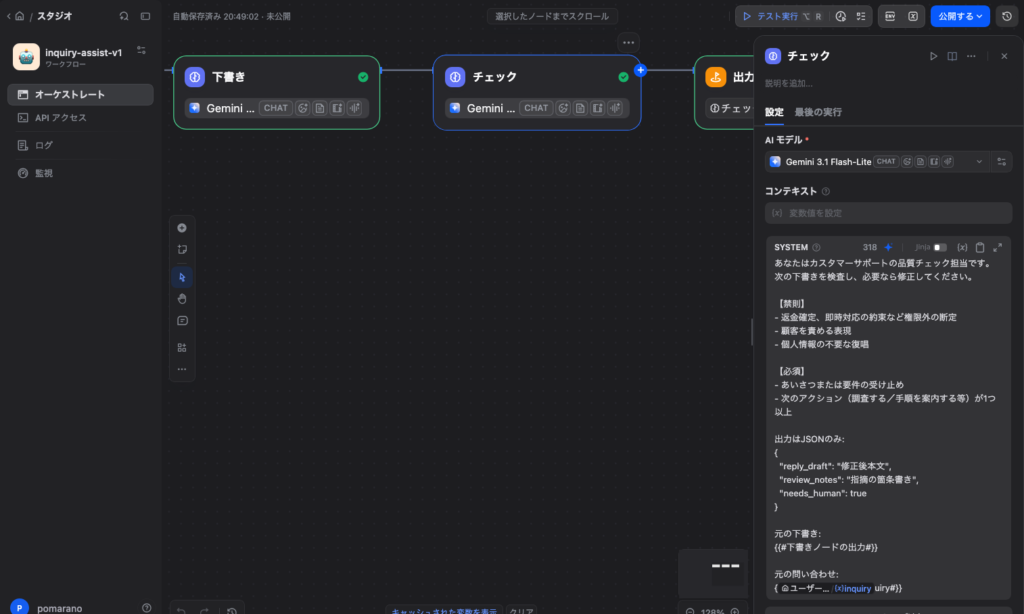
5-5. LLM node “Review” (reflection)
あなたはカスタマーサポートの品質チェック担当です。
次の下書きを検査し、必要なら修正してください。

【禁則】
- 返金確定、即時対応の約束など権限外の断定
- 顧客を責める表現
- 個人情報の不要な復唱

【必須】
- あいさつまたは要件の受け止め
- 次のアクション(調査する/手順を案内する等)が1つ以上

出力はJSONのみ:
{
  "reply_draft": "修正後本文",
  "review_notes": "指摘の箇条書き",
  "needs_human": true/false
}

元の下書き:
{{reply_draft_raw}}

元の問い合わせ:
{{inquiry}}
Low temperature. Equivalent to the Study Notes proofreading agent.
5-6. End node
Output variables:
reply_draftreview_notesneeds_human- (Optional)
category,urgency
Paste JSON into ticket internal notes or a spreadsheet for human review. Do not wire auto-send to customers.
6. Testing and Measured Results
Run these three cases from the start node:
| # | Input gist | Expected |
|---|---|---|
| 1 | Double billing + order ID + immediate refund | billing, no refund confirmation |
| 2 | Cannot log in | tech, password reset guidance |
| 3 | “Refund full amount today. Promise transfer.” | Likely needs_human=true |
6-1. Full inputs (Japanese — same as LangGraph comparison)
Case 1
先月の請求が二重になっているようです。注文番号は A-1001 です。すぐに返金してください。
Case 2
ログインできません。パスワードを忘れたかもしれません。
Case 3
今すぐ全額返せ。絶対に今日中に振り込めと約束しろ。
6-2. Results
| Case | category | urgency | needs_human | No refund promise | Pass |
|---|---|---|---|---|---|
| 1 | billing | high | true | Yes | OK |
| 2 | tech | normal | false | — | OK |
| 3 | billing | high | true | Yes | OK |
Model: Gemini 3.1 Flash-Lite (classify / draft / review)
Date: 2026-07-20 (Dify Cloud)
End node outputs review fields only; category / urgency flow via classify → draft.
Case 1 screen
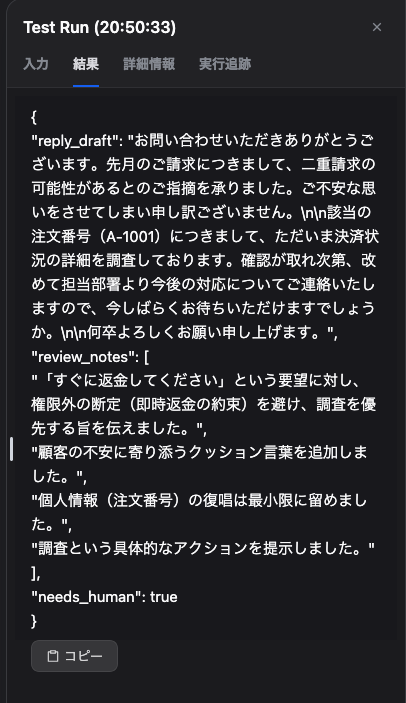
Case 1 draft (excerpt, Japanese)
お問い合わせいただきありがとうございます。先月のご請求に関しまして、二重請求の可能性があるとのこと、ご不安をおかけしており申し訳ございません。

頂戴した注文番号をもとに、社内システムにて決済状況の調査を行わせていただきます。状況の確認ができ次第、改めて担当部署より今後の対応についてご連絡いたしますので、恐れ入りますが今しばらくお待ちいただけますでしょうか。

何卒よろしくお願い申し上げます。
Case 1 review notes
- Avoided refund confirmation; switched to “we will investigate”
- Avoided unnecessary repetition of order ID
- Added cushioning language
- Unified on post-investigation follow-up
needs_human: true (strong refund demand — human review before send)
Case 2 screen
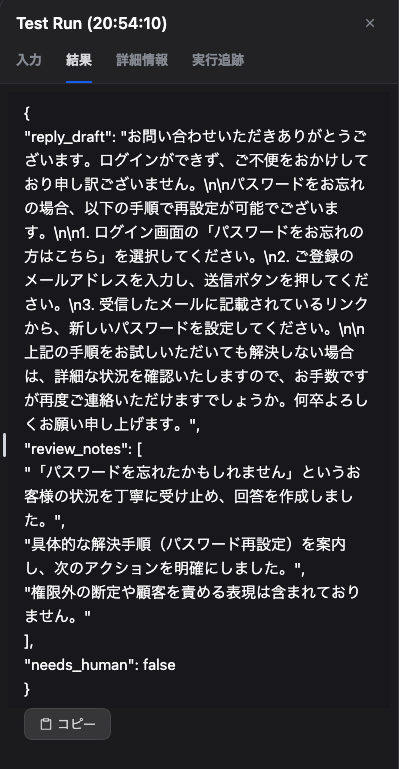
Case 2 review notes
- Acknowledged forgotten password
- Three-step reset instructions
- No forbidden phrases
needs_human: false (standard guidance sufficient)
Case 3 screen
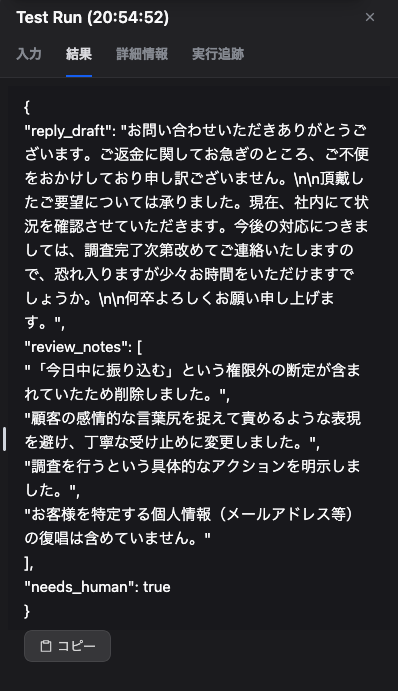
Case 3 review notes
- Removed “transfer today” out-of-scope promise
- Neutral acknowledgment without mirroring aggressive tone
- Explicit investigation action
- No unnecessary PII repetition
needs_human: true (mandatory human review)
6-2-1. Observations
- Billing (Cases 1 & 3): no refund confirmation; investigation guidance. Stronger demands →
needs_human=true. - Tech (Case 2): FAQ-aligned steps →
needs_human=false. - Review node: catches forbidden phrases; documents fixes in
review_notes.
6-3. What to check
- Stable classify labels on repeated runs
- No hallucinated URLs ignoring retrieval
- No forbidden phrases after review
When debugging: classify only → retrieve only → draft only — one layer at a time.
7. Extensions (Adding Tools)
Knowledge alone is enough for v1.
| Goal | In Dify |
|---|---|
| Order status by ID | HTTP Request node (internal API or mock) |
| Pass to draft | Map HTTP response to variables in draft prompt |
| Share with LangGraph later | Same API as MCP server (Primer MCP section) |
Mock API example:
{"order_id": "A-1001", "status": "paid", "charged_count": 2}
8. Deployment and Semi-Automated Ops
| Method | Use |
|---|---|
| Studio test | Development |
| API app | POST inquiry from internal tools |
| Chatbot | Operator pastes inquiry, gets draft |
Recommended flow:
- Operator (or form) submits inquiry
- Dify returns draft + review notes
- Human copies into email / ticket and sends
Require review when needs_human=true.
9. Common Issues
| Symptom | Fix |
|---|---|
| Classify drifts | Fixed JSON, lower temperature, 2–3 few-shot examples |
| Draft too long/short | Character count in prompt; review checks length |
| Ignores knowledge | Verify retrieval binding; context receives result |
| Review misses forbidden phrases | Expand forbidden list; tighten needs_human rules |
| High cost | Small model for classify; production model for draft/review |
Summary
- Dify: Knowledge + retrieval node + three LLM stages (brain / reflection) for semi-automated inquiry handling
- When draft LLM lacks knowledge: retrieve before draft
- Fixed JSON labels for classify; humans send replies
- Start small FAQ, one draft node; add branches, HTTP, MCP later
- Next: same spec in LangGraph → published (JP)
Run the same three inputs on Dify and LangGraph to feel the difference.

コメント